
An eSIM-capable iPhone can still reject a second carrier if the handset is locked. Check Settings → General → About → Carrier Lock and look for No SIM Restrictions, then confirm that the precise model supports the intended eSIM arrangement.
Who is this for?
A traveler books a nonrefundable itinerary, buys a travel data plan, and discovers at the departure gate that the phone is locked to the home carrier. This is not a problem with the destination network, a wrong QR code, or a failed purchase. The profile was never eligible to be installed on that device. The best time to uncover it is days before flying, not after paying.
How to compare the available choices
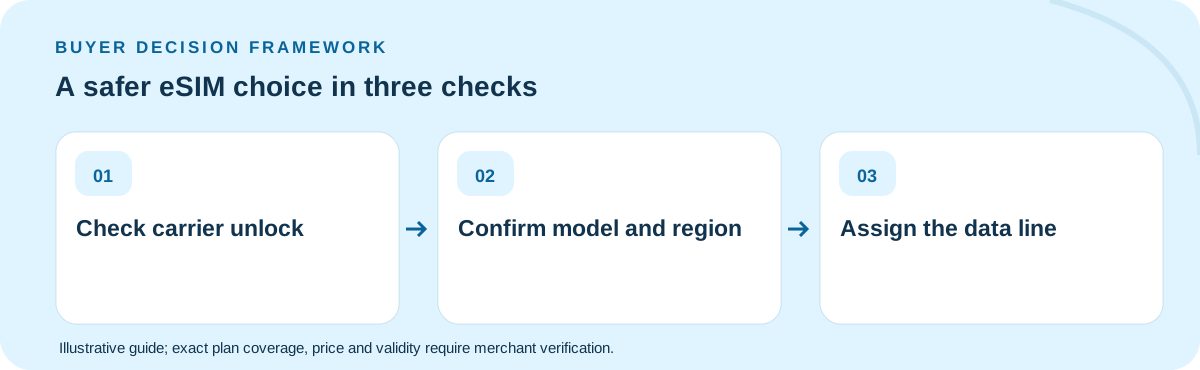
Separate the checks into hardware, carrier and product. Hardware means checking the exact iPhone model and region. Carrier eligibility means confirming unlock status and any enterprise restrictions. Product eligibility means checking whether the travel plan supports the destination, device and arrival dates. Do not infer that every model sold under the same marketing name has identical SIM provisions worldwide.
What to do before departure or purchase
Before purchasing, open Settings on the actual handset—not a screenshot from a different phone. Verify Carrier Lock, available cellular lines and Wi-Fi access. Keep the home line provisioned if it must receive banking codes; select the travel eSIM explicitly for mobile data after activation. Apple’s own international eSIM support page documents these steps and regional differences.
Worked example with explicit assumptions
For illustration, a seven-day holiday requiring 6 GB does not become feasible because a reseller displays an attractive 10 GB card: if the iPhone is carrier-locked, usable capacity is effectively zero. The economic decision starts with device eligibility and only then moves to a comparison of validity, data allowance, roaming terms and final checkout total.
Common mistakes to avoid
A common failure is treating “supports eSIM” as equivalent to “unlocked for any eSIM.” Another is deleting the home line during installation, which can interrupt familiar SMS and account recovery. A third is leaving automatic cellular-data switching enabled without checking what your home carrier might charge for data roaming.
What would change the answer?
The decision changes when the phone is supplied by an employer, acquired under a carrier payment plan or sourced from a region with different SIM arrangements. A device can have an eSIM menu and still be prohibited from using a second network. For a shared family phone, check the carrier account owner can request unlocking before the departure deadline. Compare any unlocking delay against the date the prepaid plan would first become usable.
Five-item decision worksheet
| Check | What to verify |
|---|---|
| Eligibility | Confirm the exact device, activation method and covered destination(s) against the retail product, not a country-average study. |
| Validity | Work backward from the situation described in this guide: A traveler books a nonrefundable itinerary, buys a travel data plan, and discovers at the departure gate that the phone is locked to the home carrier. Check when the clock starts and the last active day. |
| Usage | Estimate the full-speed GB or communication capabilities this particular itinerary needs; include hotspots, essential apps and an emergency buffer. |
| Economics | Compare current final payable totals only among options that meet every requirement; treat any arithmetic example here as hypothetical. |
| Fallback | Before departure, consider this failure mode: A common failure is treating “supports eSIM” as equivalent to “unlocked for any eSIM. Keep the seller’s support instructions available offline. |
Which option should you buy?
Treat unlock verification as a hard purchase gate. If it fails, contact the original carrier or use the permitted connectivity alternative rather than repeatedly buying new QR codes. Once it passes, compare current TripoSIM options for the exact destination and read the installation and activation conditions.
Can I use a travel eSIM while keeping my normal number?
On compatible, unlocked iPhones, Dual SIM can preserve the home line while another eSIM handles mobile data. Calls or SMS on the home line may still incur carrier charges; verify settings and charges first.
Primary technical/regulatory reference: official guidance for this topic. This source provides background, not a verification of any live TripoSIM SKU. The scenarios, prices and quantities in this guide are illustrations, not tested carrier offers. Every product's eligibility, data, voice, coverage, activation, fair use and current final price must be checked with the seller before purchase.
Ownership: This website is commercially affiliated with TripoSIM. It does not claim independent testing, neutrality or live catalog pricing. See research methodology.